Pyramids
- Stronghold Crusader Map Design
- 2 mins
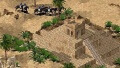 Take your map to Egypt or Mesopotamia where you are certain to find pyramids built to honour some long forgotten deity...
If you fancy being Pharoe for a day, then you will need your own pyramids. Buy some slaves and get to work - there's various ways you can make a pyramid, but try this one for starters:
- Place a square of mid-height terrain on your map
- Around the mid-height terrain, place a border of normal walls (the second level of your pyramid)
- Around the normal walls, place a border of low walls (the bottom layer of your pyramid)
- Around the inside edge of your mid-height terrain, place a border of low walls (the third level of your pyramid)
- Within the low walls border, place high walls (the top level of your pyramid)
- At the very centre of your pyramid, lower the terrain to ground level and place a small tower
- From between one to four sides of the normal wall border around the tower, delete a strip (one or two tiles wide) of wall down to ground level (exposing the various levels of terrain beneath)
- Create steps down to ground level in the gaps where you deleted the walls
- If the steps extend outside the bottom layer of your pyramid, protect either side of them with low wall
- Create sand dunes of varying height around the pyramid, in some cases deleting portions of the walls to allow the sand to "cover" the pyramid
- Place shrubs and the occasional palm tree in the vicinity of the pyramid
You should now have your first pyramid. You can experiment with additional levels created by varying heights of terrain under the walls, and for more accurate control of wall heights you can use the "lowered wall" trick. You should also experiment with different sizes of tower in the centre of the pyramid.
To create the effect of a ruined pyramid, simply set some enemy spearmen loose on your tomb in the map editor! You could also consider a little bombardment with the help of catapults! The effect will be the same.


